Your site as local files. Your agent does the rest.
SleekCMS Sync pulls your site into a local workspace of EJS templates, JSON content, and CSS, then pushes every save back live. Open it in Claude Code, Cursor, or any coding agent and build at AI speed.
Three steps, start to finish.
One command installs it. No token to copy - sign in from the browser and go.
Install SleekCMS Sync
Sets up Node if needed and installs the sleekcms launcher.
curl -fsSL https://app.sleekcms.com/install.sh | shirm https://app.sleekcms.com/install.ps1 | iexRun it and name your site
Sign in from your browser and enter a name. Sync scaffolds a local workspace with AGENT.md and CLAUDE.md baked in.
$ sleekcms
✓ signed in
? New site name: my-studio
✓ workspace ready → ~/SleekCMS/my-studioBuild it with your agent
Open the workspace, start your coding agent, and describe the site. Every save auto-syncs and deploys - preview it live as it takes shape.
$ claude
> Build a portfolio site with a hero,
  projects, and a contact form.
↑ syncing pages/home.ejs
✓ build deployed · liveStandard files. No black box.
Your workspace is plain EJS templates, JSON content, and CSS. No proprietary format, no export hostage-taking. You own every line - edit it in any editor, with or without AI.
AGENT.md
→
Any coding agent · GitHub Copilot agent mode
CLAUDE.md
→
Claude Code
.vscode/copilot-instructions.md
→
GitHub Copilot in VS Code
These ship in every workspace with the complete platform reference - file conventions, model syntax, template helpers. Your agent understands the project from the first prompt, and still does in next month's session.
Prefer deliberate pushes? Manual mode holds changes until you say go - let an agent finish a batch of edits, review, then push them as one action. Per-file issues land in sync-errors.log, so nothing fails silently.
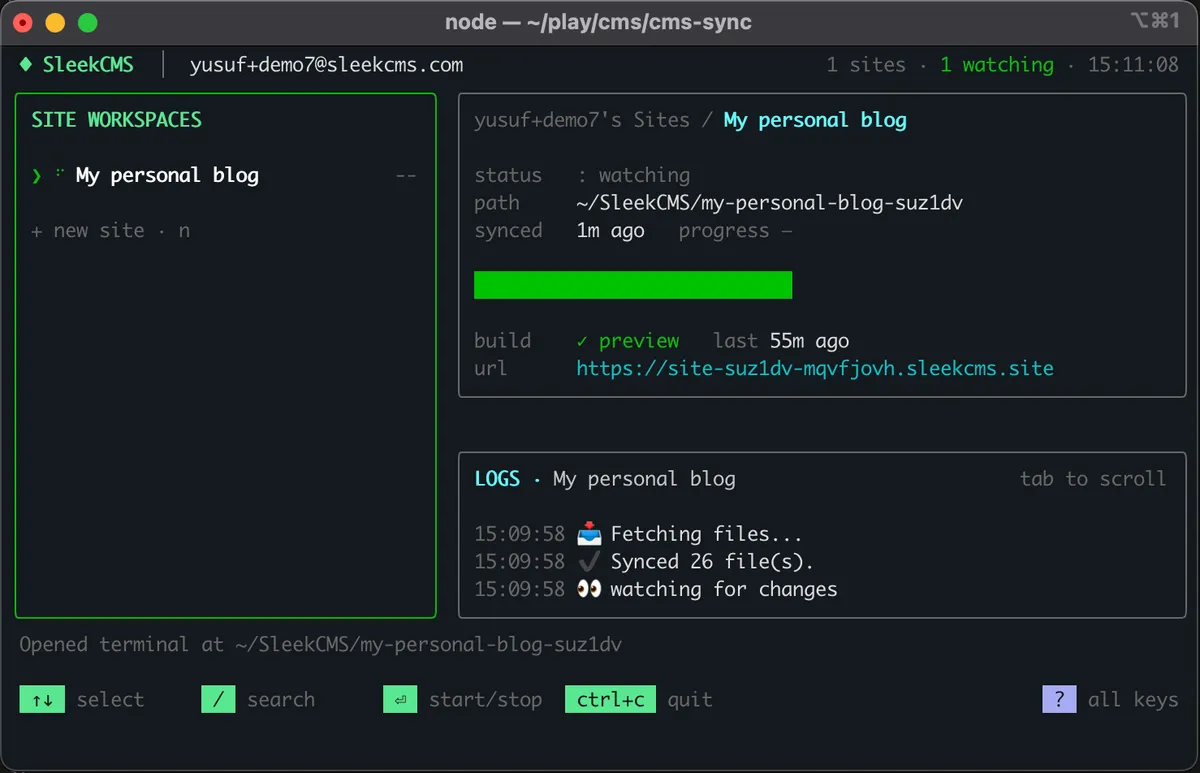
The Sync dashboard - workspaces, live sync status, build & preview URL, and logs in one view.
Every site. One dashboard.
The Sync dashboard watches all your sites at once - live sync status, logs, and the preview URL always in view. Build a preview or deploy live with a keystroke, and jump straight into any workspace with the tool of your choice - VS Code, Cursor, Claude Code, Pi.
Build big
Let Claude Code generate a 50-page site into the workspace.
Bulk edit
Point an agent at a client site for sweeping updates.
Hand edit
Or just open your editor and tweak a template yourself.
Related features
AI Website Builder
The full picture: built-in assistant in the app, your own agent through Sync.
Learn moreStatic Site Generator
The cloud framework your synced templates run on - zero overhead, all pre-plumbed.
Learn moreHeadless CMS
The same models and content, delivered over a one-fetch REST API with typed SDKs.
Learn moreOne command. Then it's you and your agent.
Install SleekCMS Sync, sign in from the browser, and your first site is minutes away.